Creating Cafeterias of Consistency & Excellence

Training built only for K12 nutrition. Every position on its own learning path, every lesson in the language your staff speak, and every hour on one audit-ready transcript, for one district or a whole FSMC portfolio.

Why FIG Learning

One place to train, assess and prove it.

Most nutrition teams train on one in-service day a year, then track CEUs in a different spreadsheet at every school and build the audit report by hand. Knowledge walks out the door when experienced staff retire. FIG Learning replaces that patchwork with a single, audit-ready home for training.

It is organizational improvement, not only a learning management system: the same expectations, taught the same way, at every site you serve.

  • 100+Training languagesFull lessons, dubbed
  • MobileFIG app for iOS & Android
  • CEUsEarned while you learn
  • OneTranscript per personOutside training included

Taking training

Training in their own language, on their own phone.

Staff choose their language and hear the full lesson dubbed. They can take it at a workstation, on the line between services, or at home on the FIG mobile app.

Course player

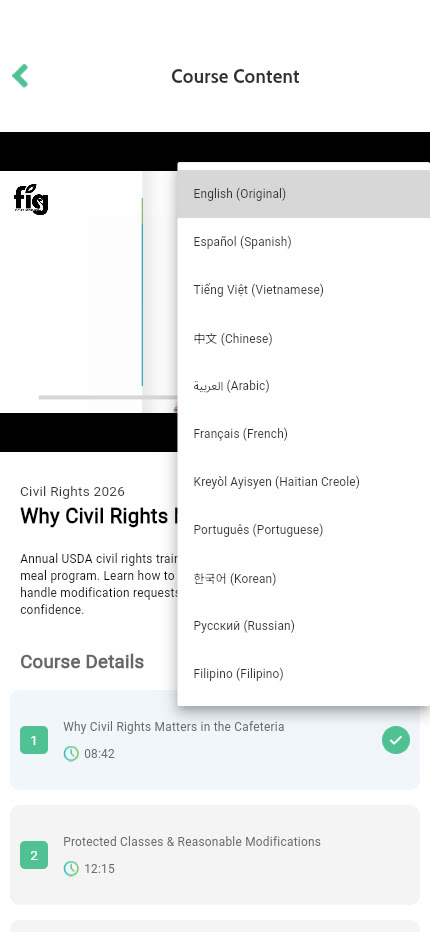
Pick a language. Hear the whole lesson.

The FIG course player switches the narration of a lesson to the learner's language, so a cook who is more comfortable in another language learns the same standard as everyone else, at the same time.

  • 100+ languages from a single menu
  • Video lesson, overview, game-plan resource and a final check
  • The same course on the web and in the FIG app
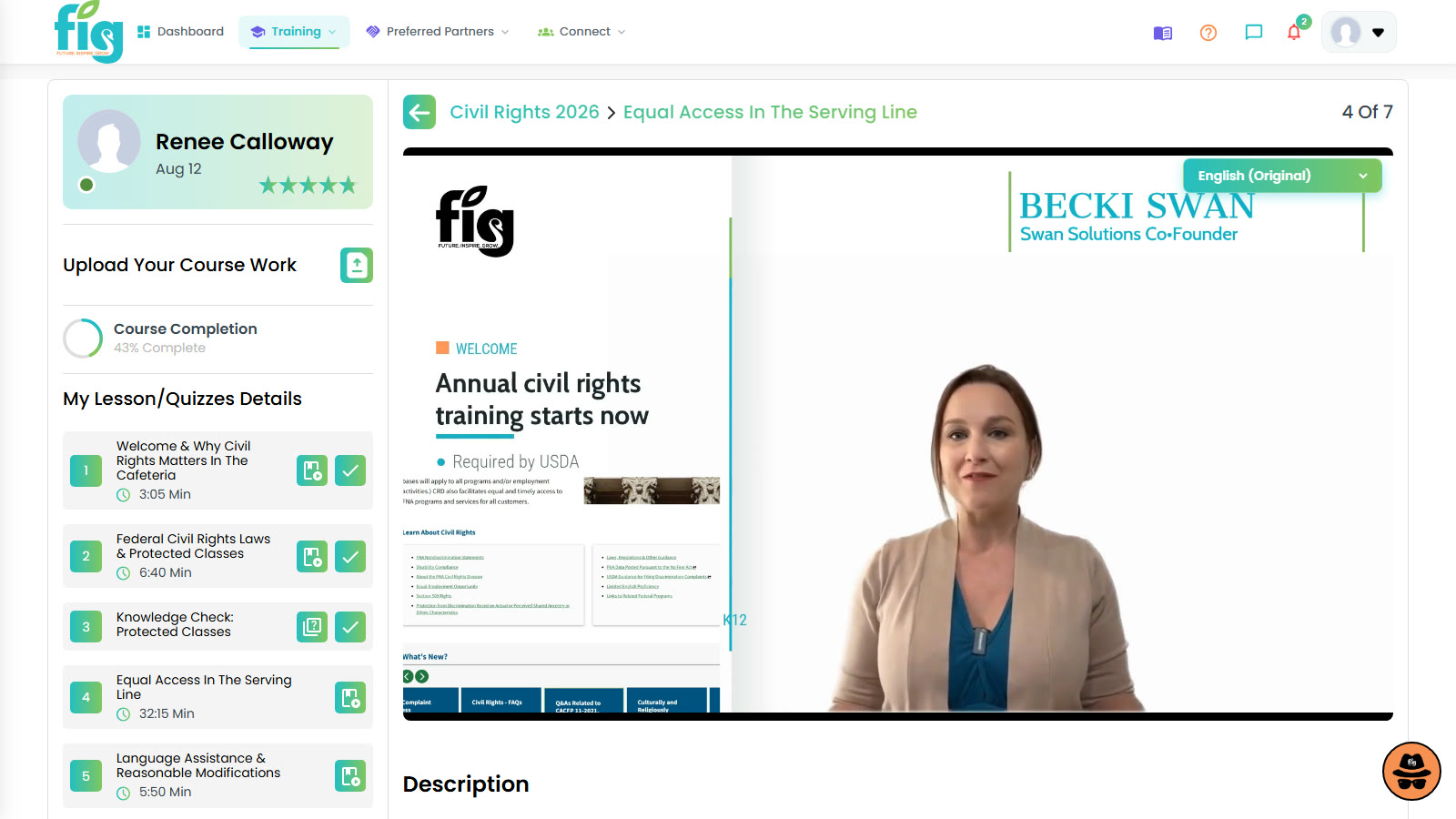
FIG Learning course player with the language picker open beside a lesson video
FIG mobile app lesson with the 100+ language menu open

The web course player, with the same lesson open in the FIG mobile app.

Real FIG screen · demo data
In their own language

Lessons dubbed into 100+ languages, so language is never the reason someone falls behind.

On their phone

Courses, CEUs and notifications in the FIG app for iOS and Android.

Train as a group

Run an in-service, have the room check in by QR code, and give every attendee credit with audit evidence.

Set it and forget it

Schedule required training once and FIG assigns it to the right people on time, every year.

Built around every position

A learning path for every position.

A cook, a cashier, a kitchen manager and a new hire each need something different. FIG Learning gives each one a path, measures what they can do, and keeps the record.

Learning paths

From new hire to kitchen manager

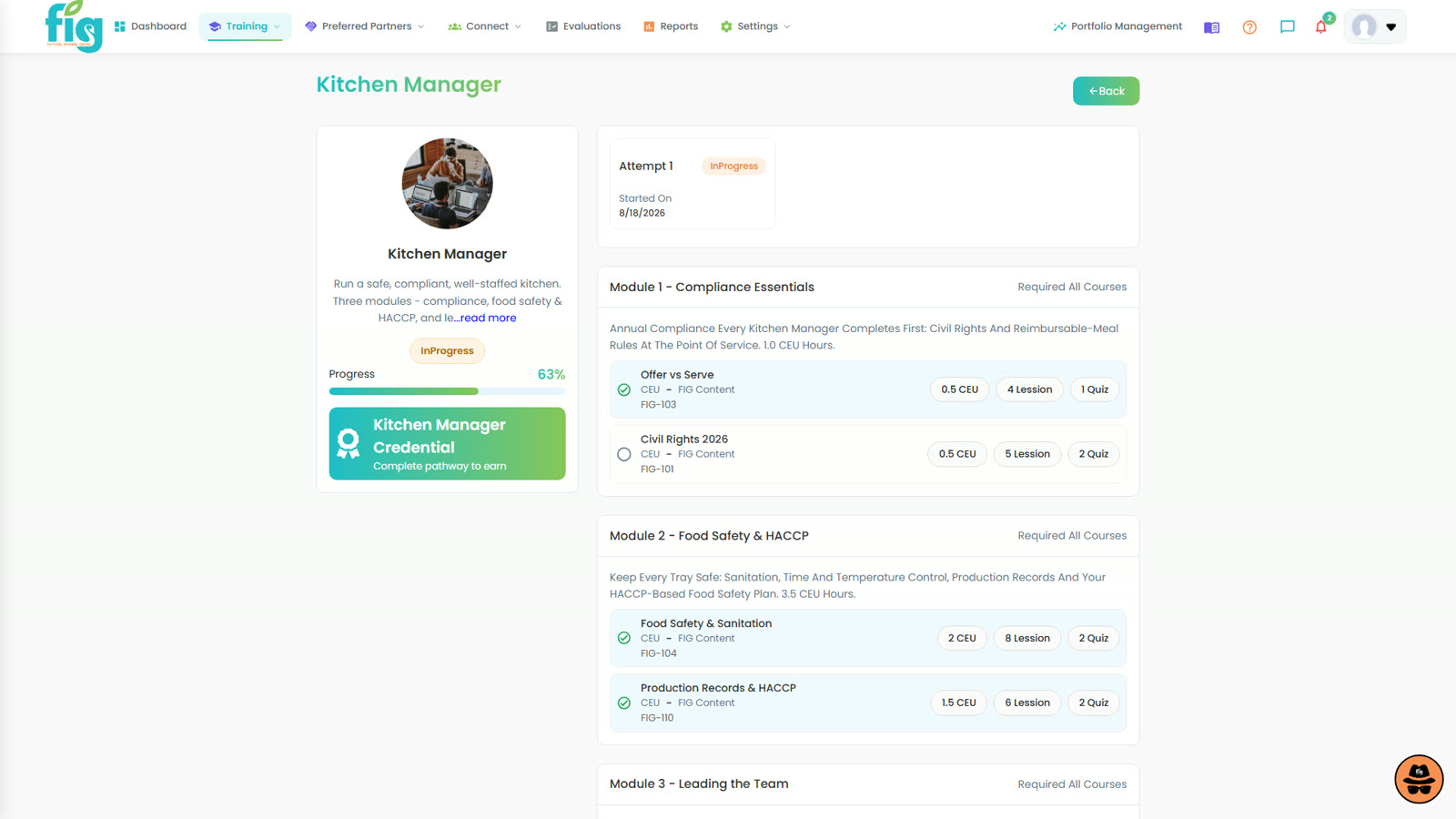
Build a path for each role with modules grouped in the order people actually learn the job. Badges mark progress, and managers see exactly where each person stands.

  • Paths by position: cook, cashier, manager, new hire
  • Grouped modules and badges
  • Assign to one person, a school, or a whole district
FIG Learning path for a Kitchen Manager with modules grouped into sections and progress shown

A Kitchen Manager learning path, grouped by module.

Real FIG screen · demo data

Employee assessments

Measure skill, not seat time

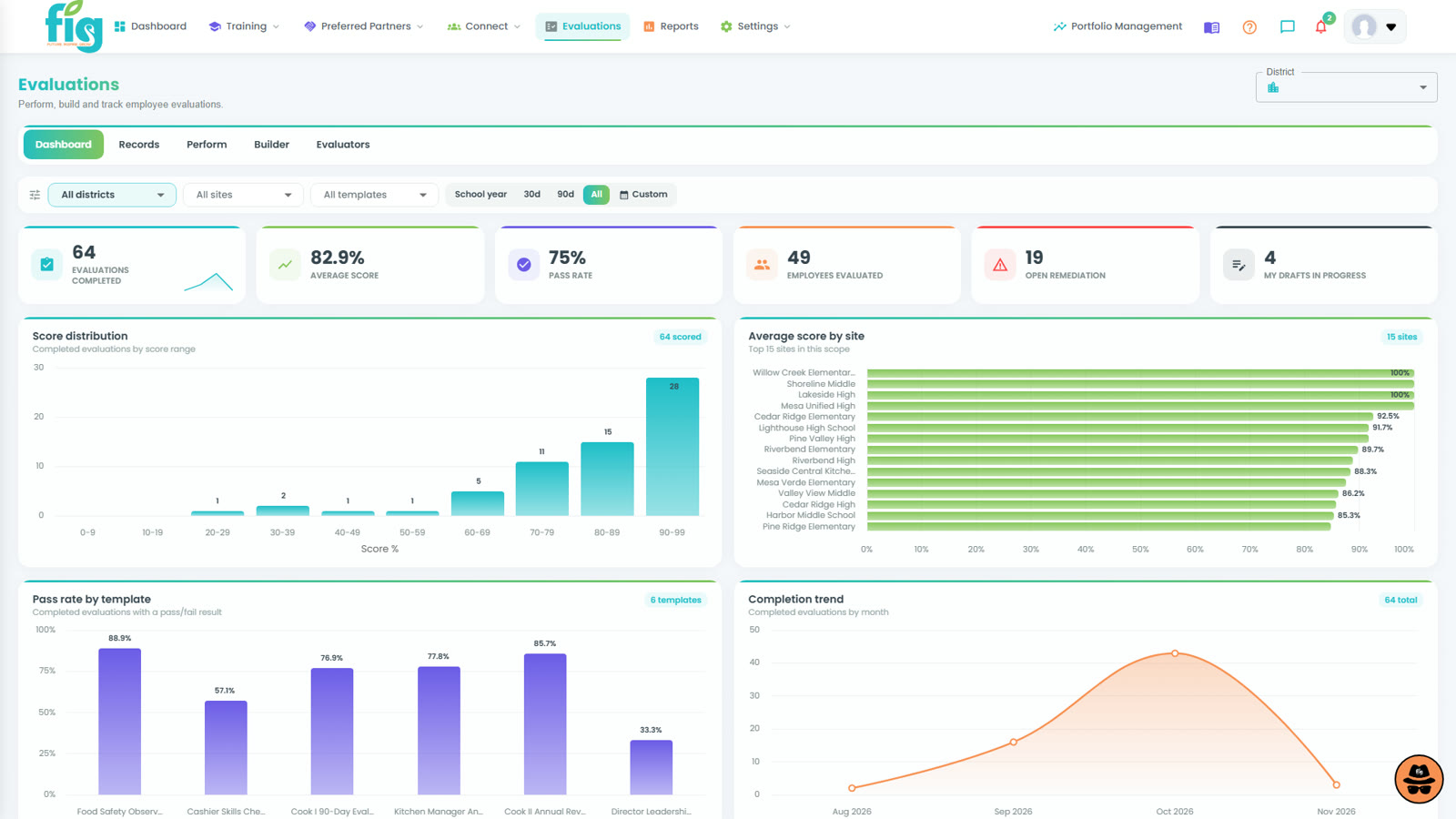
Assessments and evaluations show whether someone can do the job, not only that they watched the video. Results tie training to coaching and, when needed, corrective action.

  • Employee evaluations in one dashboard
  • Connect results to the next course or coaching step
  • A documented record when performance needs follow-up
FIG Learning employee assessments and evaluations dashboard

Employee assessments and evaluations.

Real FIG screen · demo data

Transcripts & certificates

Ready when the auditor shows up

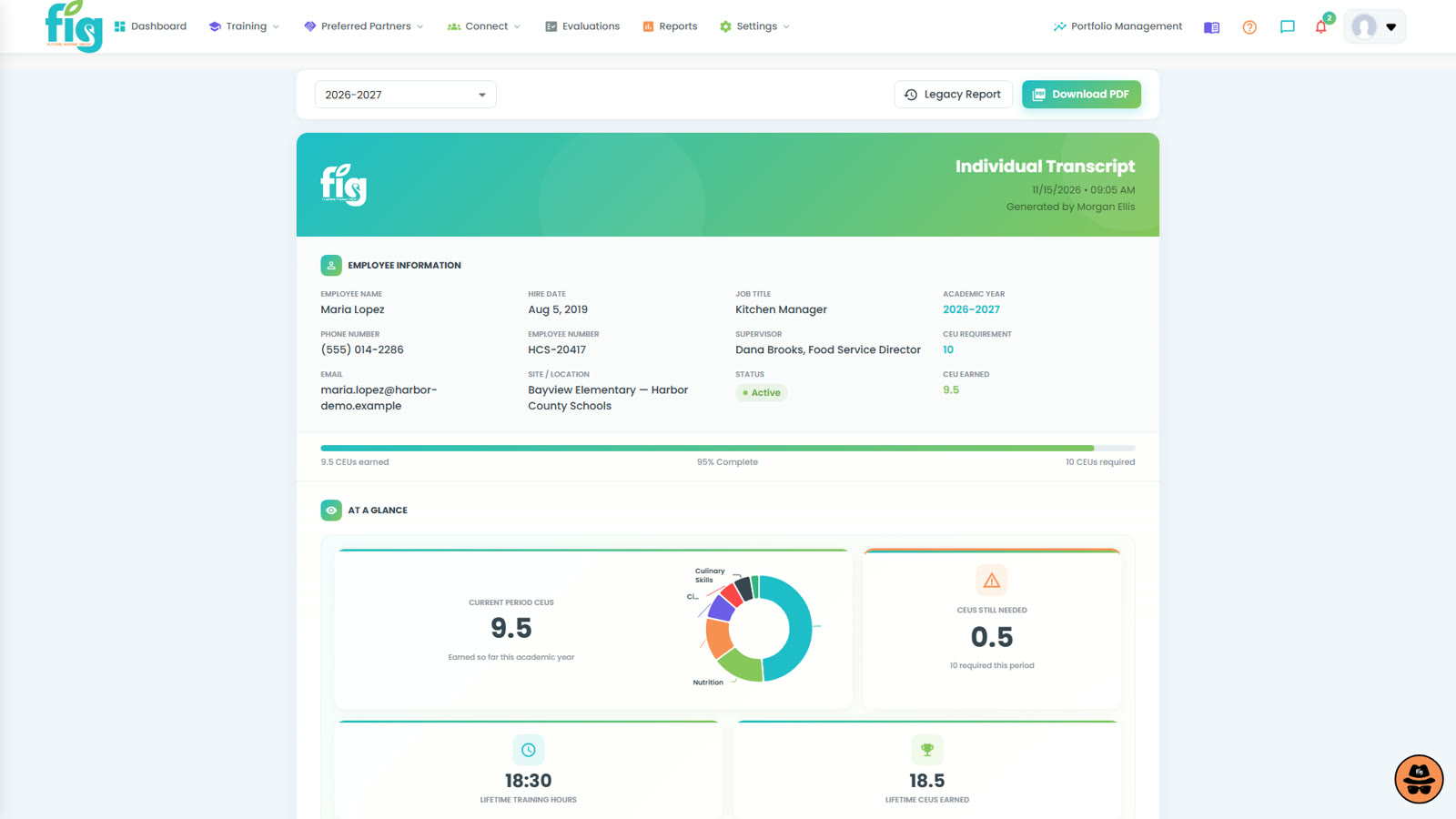
Every course, certificate and CEU lands on one transcript per person. Upload outside certificates and import historical records so the whole training history follows the employee, even when they change schools.

  • Individual transcripts and certificates
  • Outside and historical training on the same record
  • Professional Standards hours without the spreadsheet
FIG Learning individual learner transcript listing completed courses, hours and certificates

An individual learner transcript.

Real FIG screen · demo data

Course catalog & Preferred Partners

Taught by the people who know it best.

The course catalog brings together FIG courses, your own district courses, and courses taught by Preferred Partners: the manufacturers, technology providers and consultants specific to K12 nutrition, teaching as subject-matter experts.

Course catalog

One catalog. Assign it anywhere.

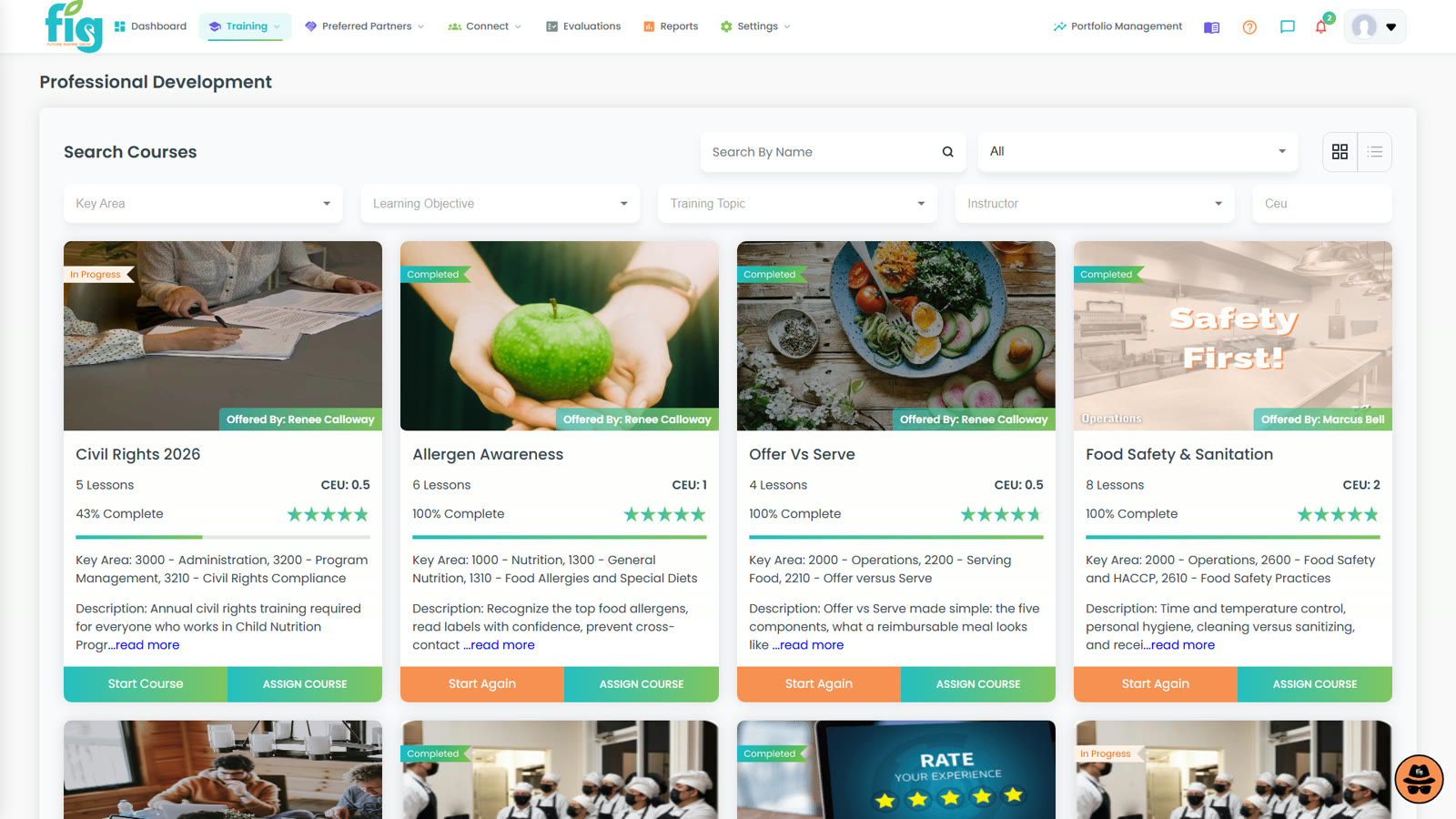
Browse, preview and assign courses to one person or an entire district. Preferred Partner courses are reviewed by FIG and mapped to training credit, so every one of them counts toward Professional Standards hours.

  • FIG, district and Preferred Partner courses side by side
  • Record your veterans' know-how as courses before they retire
  • Partner courses can sit inside role-based learning paths
FIG Learning course catalog including courses offered by Preferred Partners

The course catalog, including Preferred Partner courses.

Real FIG screen · demo data

Preferred Partners

The expert, not the vendor.

Partners teach why the job is done the way it is, from inside the training plan rather than the exhibit hall. The program bridges districts and the vendors specific to K12 nutrition.

CEUs & training hours

Earn CEUs while you learn.

Continuing education

Every hour counts

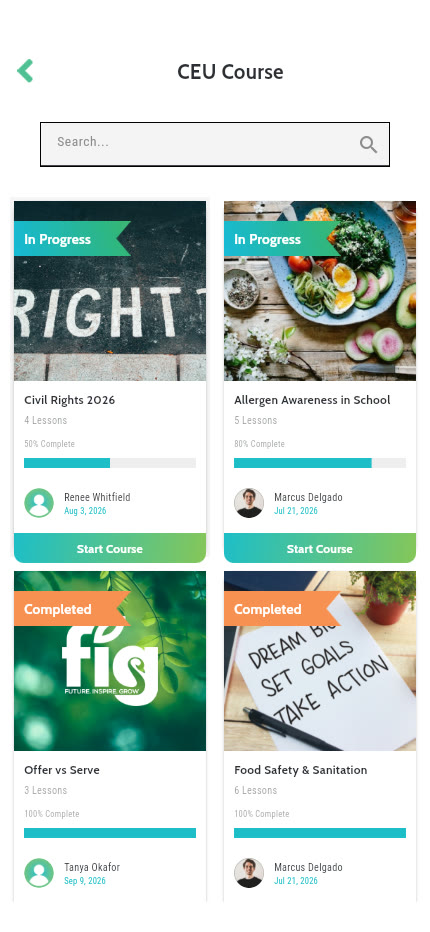
CEU courses carry credit, and completed training tracks toward Professional Standards hours automatically. Staff see their own progress in the app, and directors stop chasing certificates by hand.

  • CEU credit on FIG and Preferred Partner courses
  • Progress visible to the learner and the manager
  • CEU certificates land on the learner's transcript
FIG mobile app list of CEU courses with progress for each

CEU courses and progress in the FIG app.

Real FIG screen · demo data
Portfolio management & reporting

One district, or many.

Portfolio management is built to accommodate food service management companies (FSMC portfolios across many districts) and is ready for state-level reporting and oversight. One account, one roll-up, and compliance status for every district you oversee.

Portfolio management

Every district in one roll-up

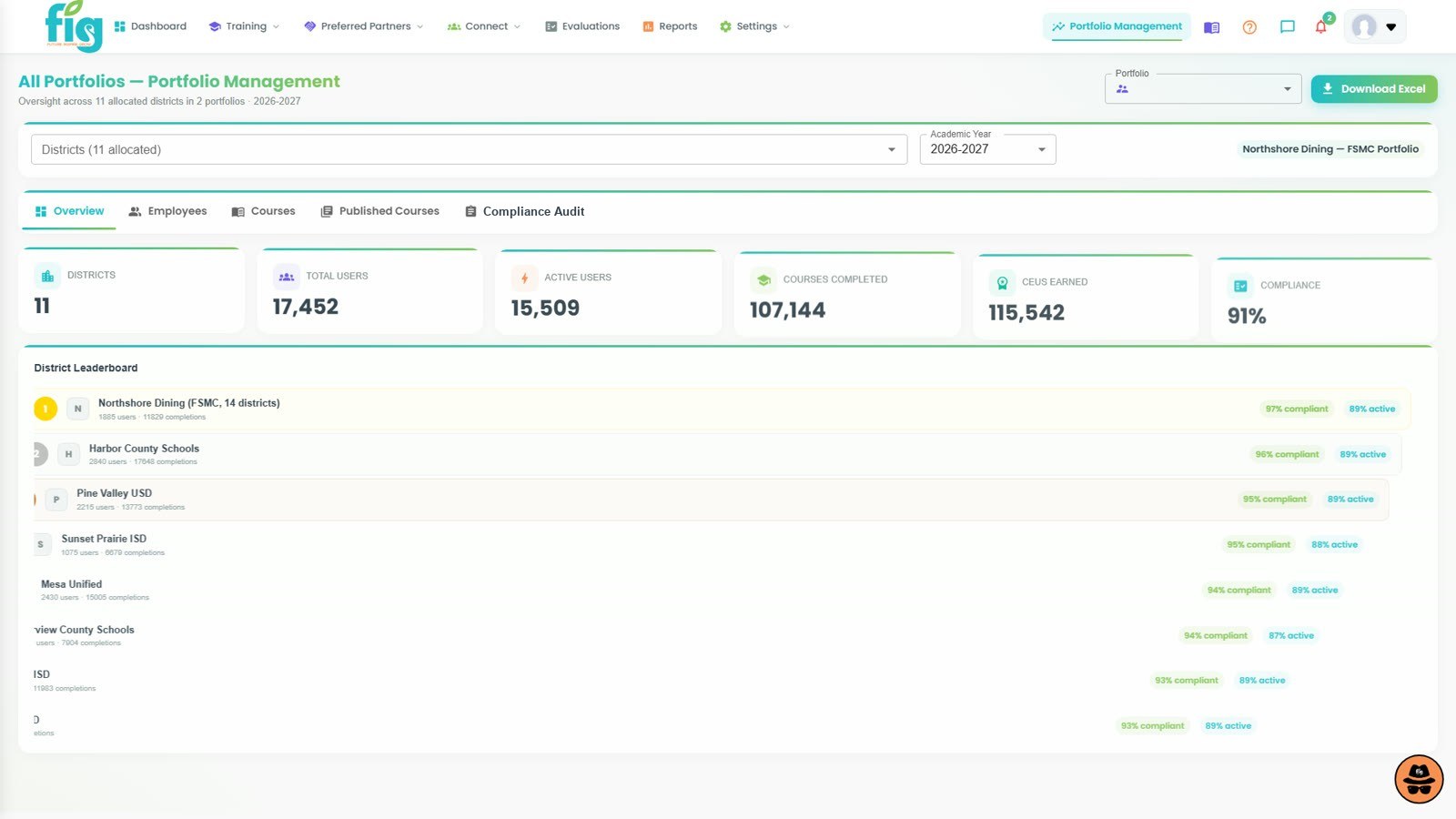
Designed for anyone overseeing more than one district. Compare districts side by side, see who is behind on required training, and export the compliance workbook, while each district keeps running its own program.

  • Multi-district roll-up with a district leaderboard
  • Compliance status by district
  • Export for your own reporting and oversight
FIG Learning portfolio management roll-up comparing training compliance across districts

Portfolio management: multi-district / FSMC roll-up.

Real FIG screen · demo data
Training dashboard

Know where training stands today

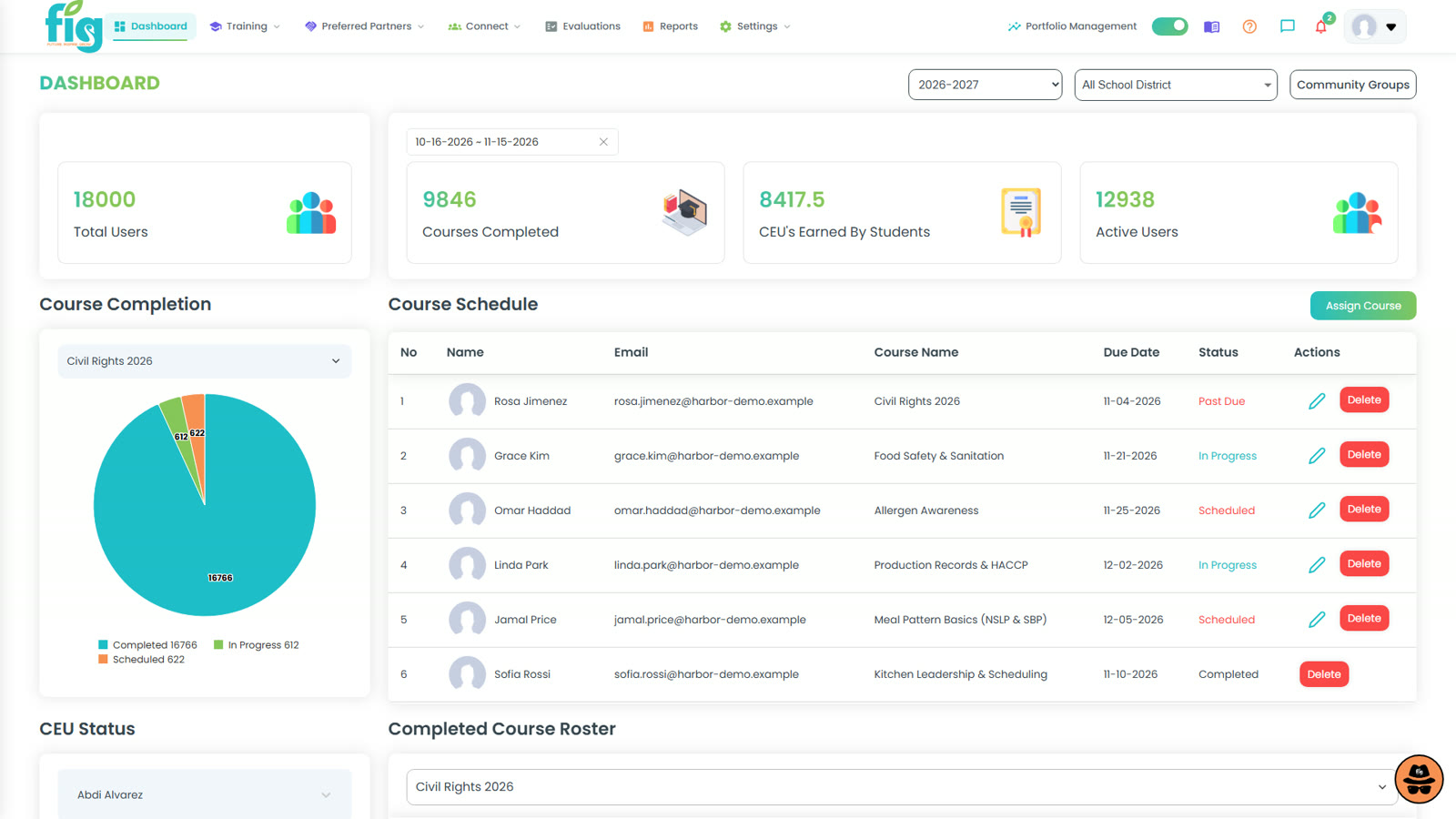
Completions, CEUs and the upcoming course schedule on one dashboard, so directors and site managers can act before a deadline instead of after it.

  • Completions and CEUs at a glance
  • Course schedule and upcoming sessions
  • Drill down by school or person
FIG Learning training dashboard showing completions, CEUs and the course schedule

The training dashboard.

Real FIG screen · demo data
Reports

The audit report, already built

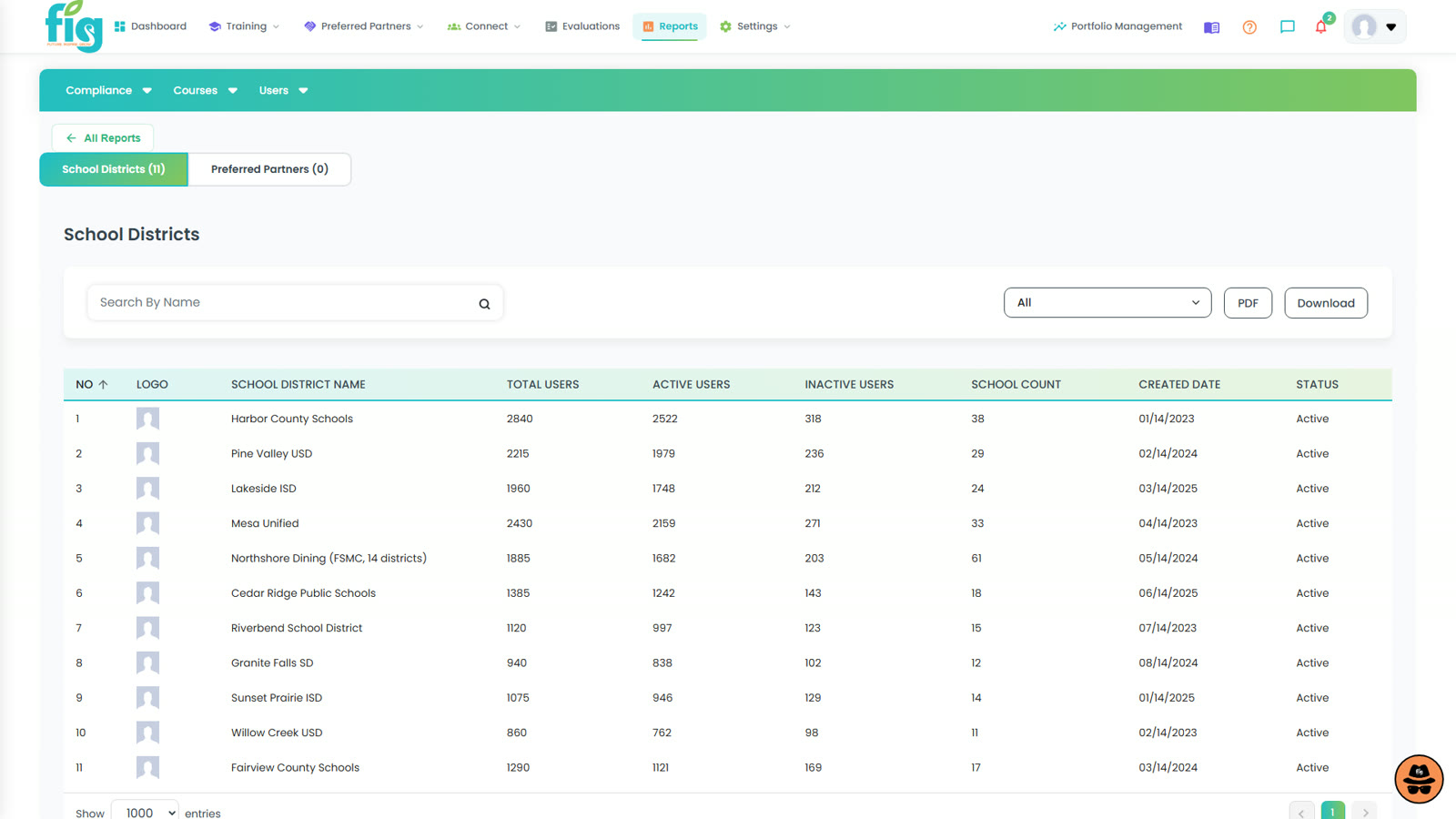
Compliance by school and by person, exportable to PDF or Excel. The report you used to assemble by hand is ready whenever you need it.

  • Compliance by school
  • Export to PDF or Excel
  • The same numbers your transcripts show
FIG Learning school districts report with training compliance by school

A school districts report.

Real FIG screen · demo data

FIG mobile app

Training that goes where your staff go.

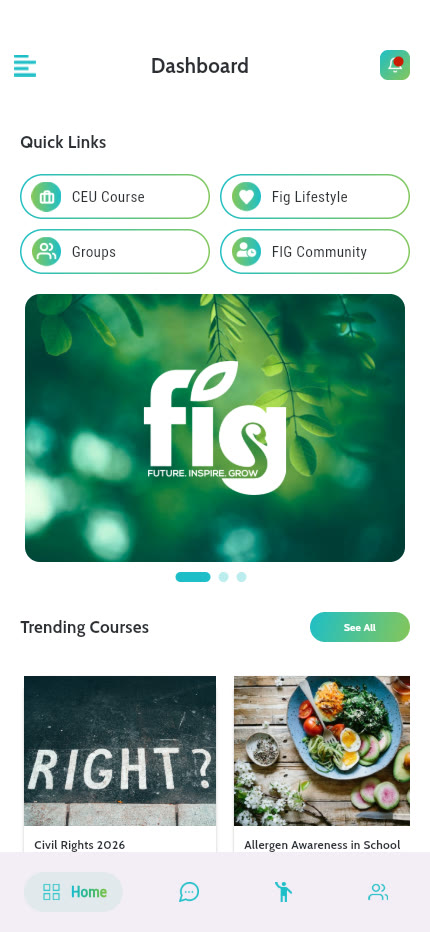
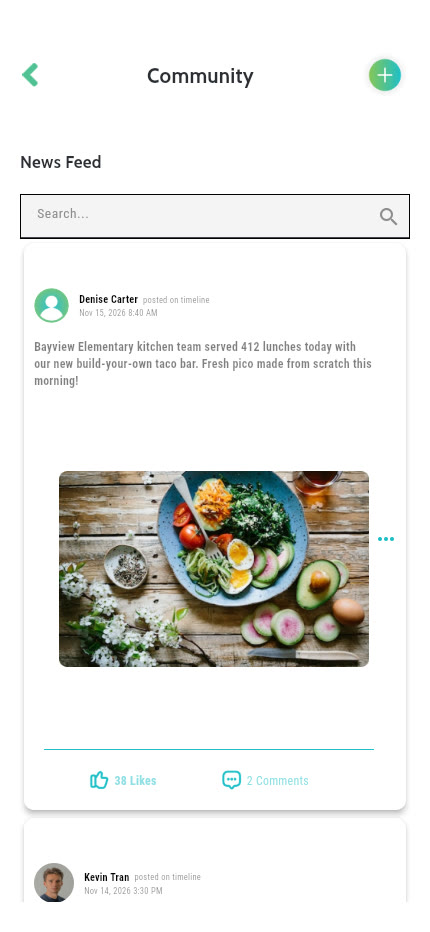
Courses, CEUs, the FIG Community feed and notifications in one app for iOS and Android: on the line, in the break room, or at home.

FIG mobile app home dashboard with assigned courses
Home: what's assigned and what's next
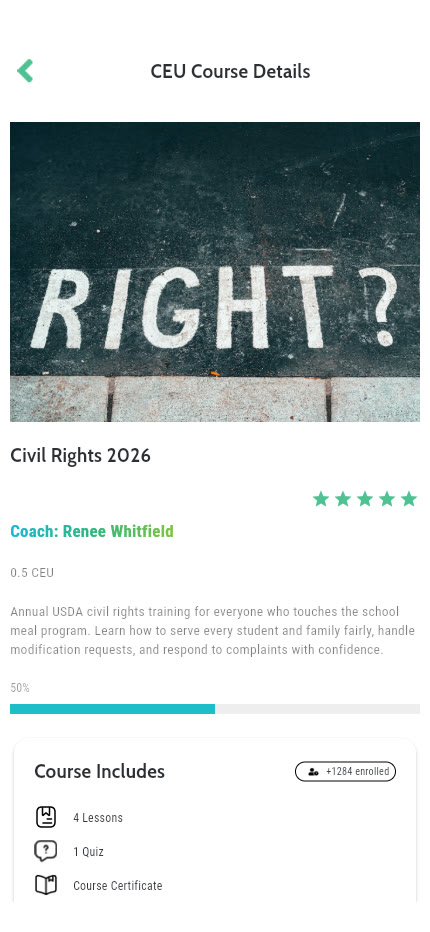
FIG mobile app course detail screen
Course detail
FIG Community feed in the FIG mobile app
The FIG Community

Real FIG app screens · demo data

Compliance

Required training, handled every year.

Annual requirements such as Civil Rights training, handbook acknowledgments and policy sign-offs run as tracked courses, with the evidence filed automatically.

Annual Civil Rights

Assign the annual Civil Rights course to everyone who needs it and see completion by school.

Handbook & policy sign-offs

Employee handbooks and policies become tracked courses with a recorded acknowledgment.

Group training evidence

QR-code check-in turns an in-person session into credit for each attendee and a record for the file.

Professional Standards hours

Hours and CEUs counted toward Professional Standards as courses are completed.

Roster import

Bring staff in from your payroll or HR exports so the right people get the right training.

Single sign-on

SAML and Clever SSO, so there is one less password for staff to forget.

Our approach

When everyone is on the same page, we create cafeterias full of consistency and excellence.

FIG Middle of the House

Trained teams run better kitchens. Next: know your numbers in real time.

FIG Learning builds the team. The Middle of the House shows how the program is running, with the numbers in real time.

Questions we hear

Before you ask.

Our staff already take free training. Why would we need FIG?

Keep it. FIG keeps every hour on one transcript, including outside and free training you upload as certificates, so your Professional Standards records live in one audit-ready place instead of a spreadsheet for every school.

Will my staff actually use it?

FIG Learning was built for the people on the serving line. Lessons play in 100+ languages, the FIG mobile app puts courses on the phone in their pocket, and group training with QR-code check-in gives credit to a whole kitchen at once, which helps staff who are not comfortable with technology.

It sounds like a lot to roll out. Where do we start?

Start small. We recommend starting with training records and CEU tracking, then adding learning paths, assessments and portfolio reporting as you are ready. The design feels like the apps your staff already use.

How do we get our people in, and how do they sign in?

Rosters import from your payroll or HR exports, and single sign-on is available through SAML and Clever. Training can be scheduled once and assigned automatically: set it and forget it.

We oversee more than one district. Does that work?

Yes. Portfolio management is built to accommodate food service management companies (FSMC portfolios across many districts) and is ready for state-level reporting and oversight. You see one roll-up with compliance status district by district, and each district still runs its own training.

Are we on our own after we sign?

No. FIG is software and a service: training and implementation support with weekly implementation meetings while you get started, from the same team that builds the product. You're never doing this alone.

FIG Learning Management

Let's start a conversation.

Tell us about your district or your portfolio, and we'll show you FIG Learning with your positions, your courses and your requirements.