Real-time finance for K12 nutrition

The first Middle of the House built for K12 nutrition.

FIG connects the POS, purchasing, back-of-house and payroll systems you already run, so you know your numbers now, not five or six weeks from now.

  • KeepEvery system you already run
  • Real timeProgram profit & loss
  • Every lineInvoices checked against bid

Connect, don't replace

Bring all of your data together.

Front of house, back of house, purchasing, labor and distributors each hold a piece of the picture, and none of them talk to each other. So the numbers get re-keyed into spreadsheets and arrive weeks late. FIG sits in the middle: it connects to each system through its API, its exports or document intelligence on the files it produces, and turns them into one live view of your program.

  • POSFront of house
  • Purchasing & POsOrders and invoices
  • Back-of-houseProduction and menus
  • Labor & payrollHours and pay
  • DistributorsPricing and deliveries
FIGMiddle of the House
  • A real-time P&L for every site
  • Every invoice line checked against your bid
  • KPIs your managers can act on
  • A reconcilable trail to source documents
Keep every system you run. Nothing to rip out, nothing to change.

We recommend starting with FIG Learning Management, then adding the Middle of the House.

Why a Middle of the House

How do you manage without the numbers?

Too many nutrition programs wait five to six weeks for a profit and loss statement, then fill the gap with spreadsheets and educated guesses. Someone checks invoice lines against bid prices by hand, when there is time. Distributors keep a separate price list for every site. The same numbers get typed into three systems.

Negative balances build quietly, even in districts that are fully CEP. Buy American documentation lives in a folder somewhere. And when the auditor shows up, the team spends weeks rebuilding a trail that should have been there all along.

The Middle of the House is where those numbers come together, every day, for every site.

Know your numbers

The money, in real time.

Income, expense, meals and reimbursement for every site, every month, as it happens.

Real-time P&L

Program profit and loss, live.

Know where you stand today, not five or six weeks from now. FIG builds your program P&L from the systems you already run, so income and expense show up by site and by month while there is still time to act on them.

  • Income vs. expense by site and by month
  • Built from your POS, purchasing and labor data
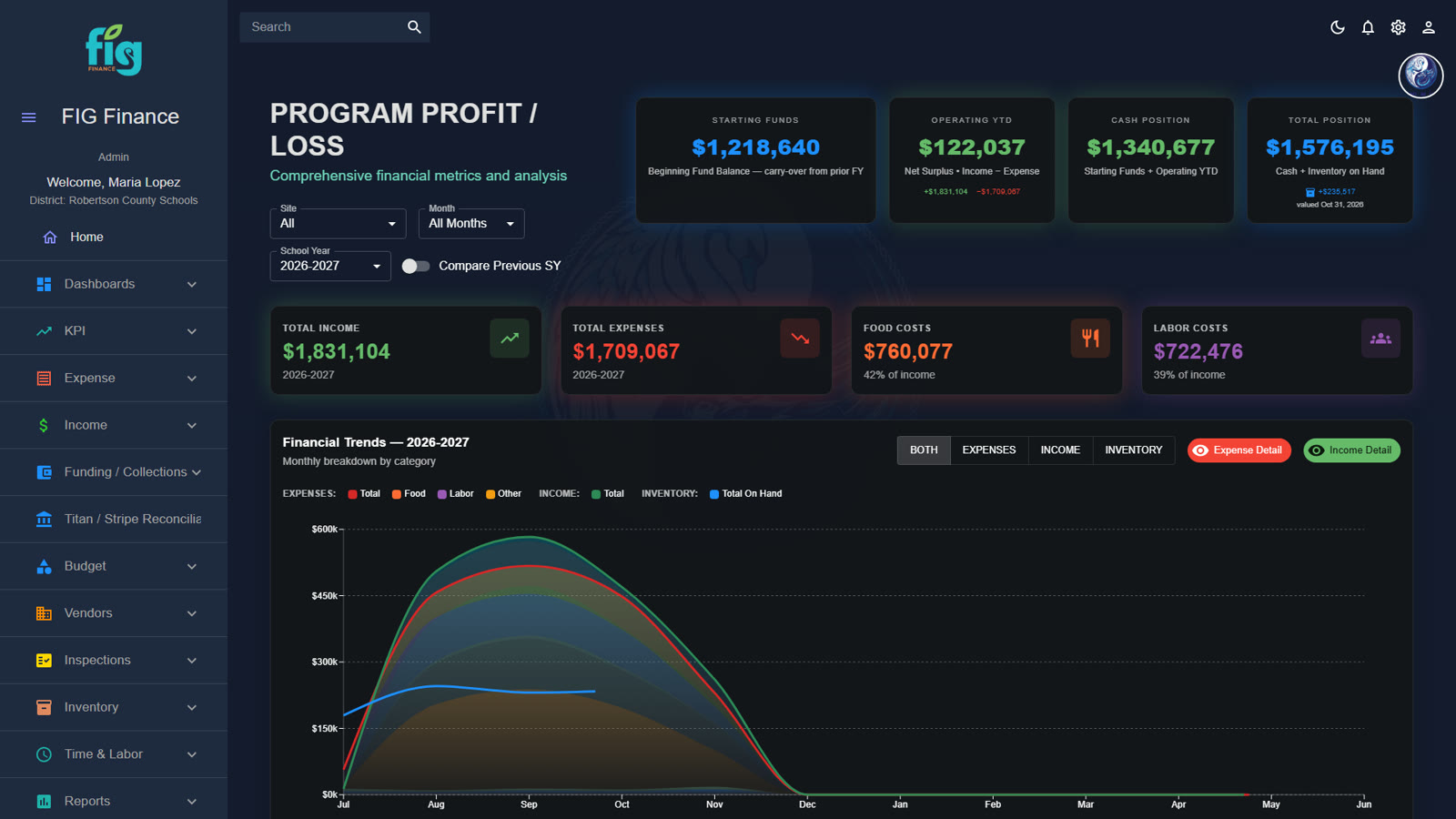
FIG Program Profit/Loss dashboard showing income and expense by month

Program profit and loss, updated as the data arrives.

Real FIG screen · demo data
Meal counts & reimbursement

Every meal, and what it earns.

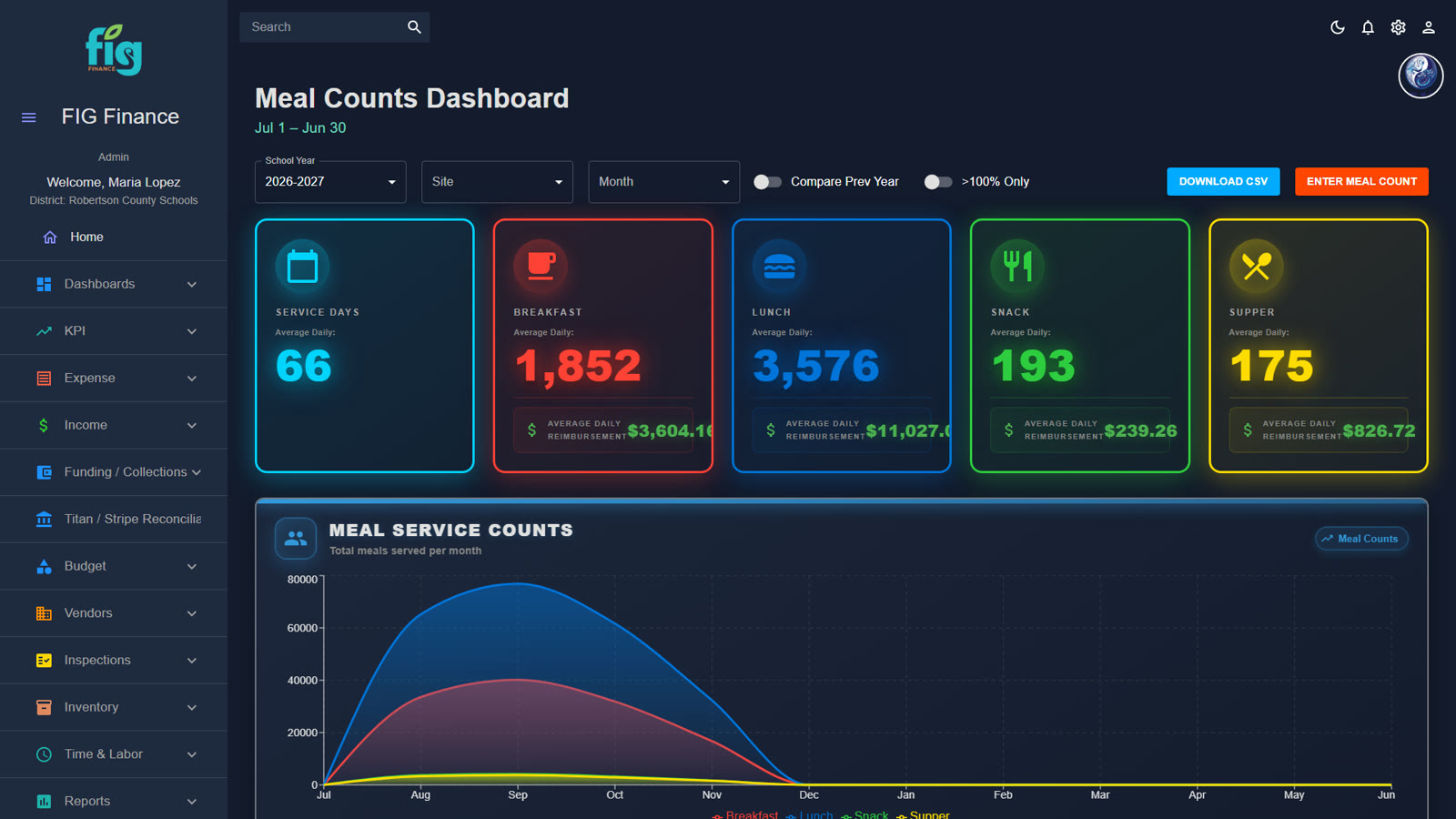
Meal counts and the reimbursement they generate sit side by side in one view, so you can see participation and revenue move together instead of reconciling two reports at the end of the month.

  • Meal counts by site, in one view
  • Reimbursement calculated alongside the counts
  • Spot participation changes while they are happening
FIG meal counts and reimbursement screen by site

Real FIG screen · demo data

Payments

Payments tracked and reconciled.

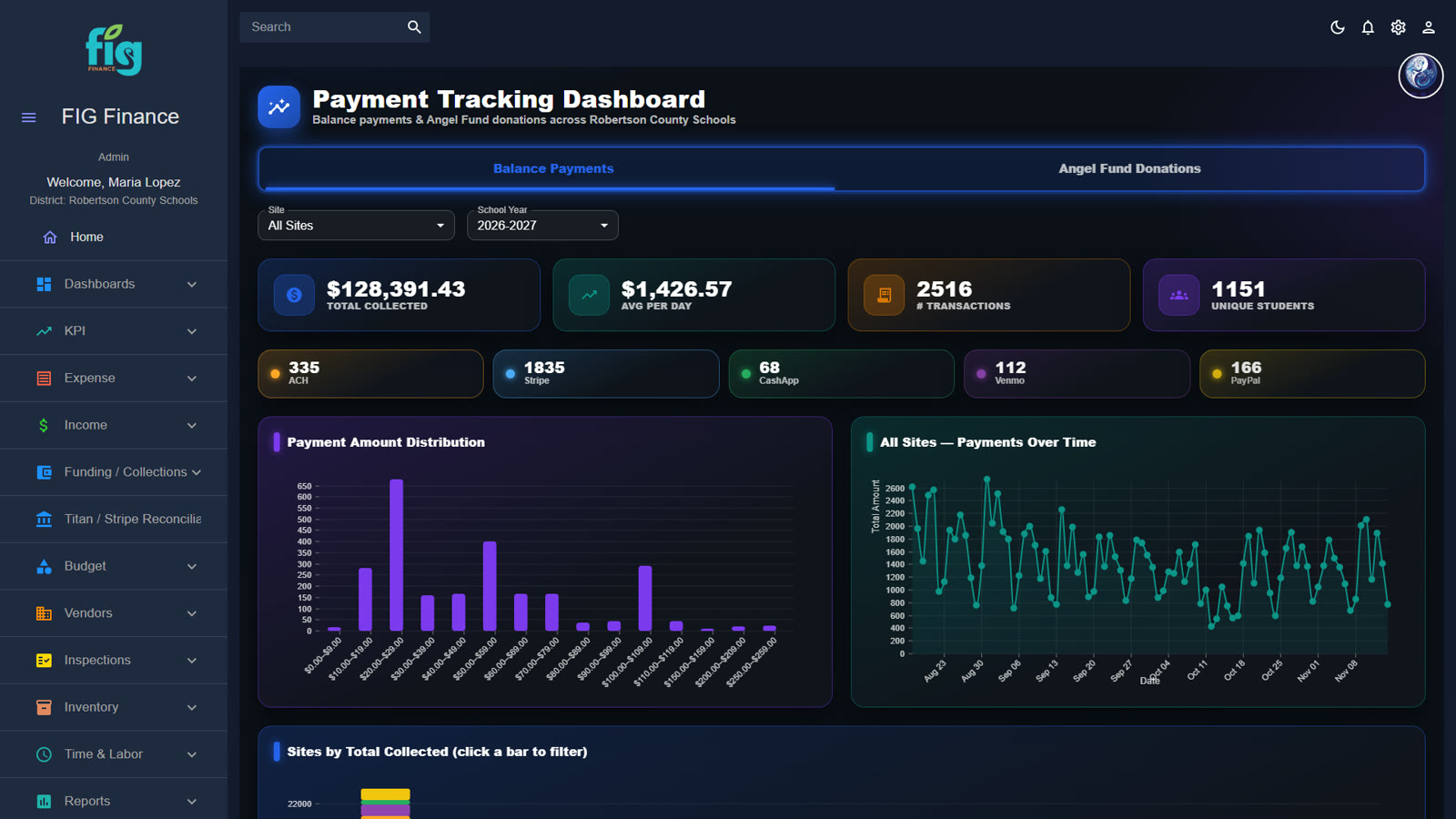
Online payments come in from the systems that collect them, and FIG tracks and reconciles them in one place, so you can see what was paid, when, and where it was applied.

  • Online payments from the systems that collect them
  • Track and reconcile online payments
  • One place to answer "did that payment post?"
FIG payment tracking screen

Real FIG screen · demo data

Negative balance management

Negative balances, handled before they grow.

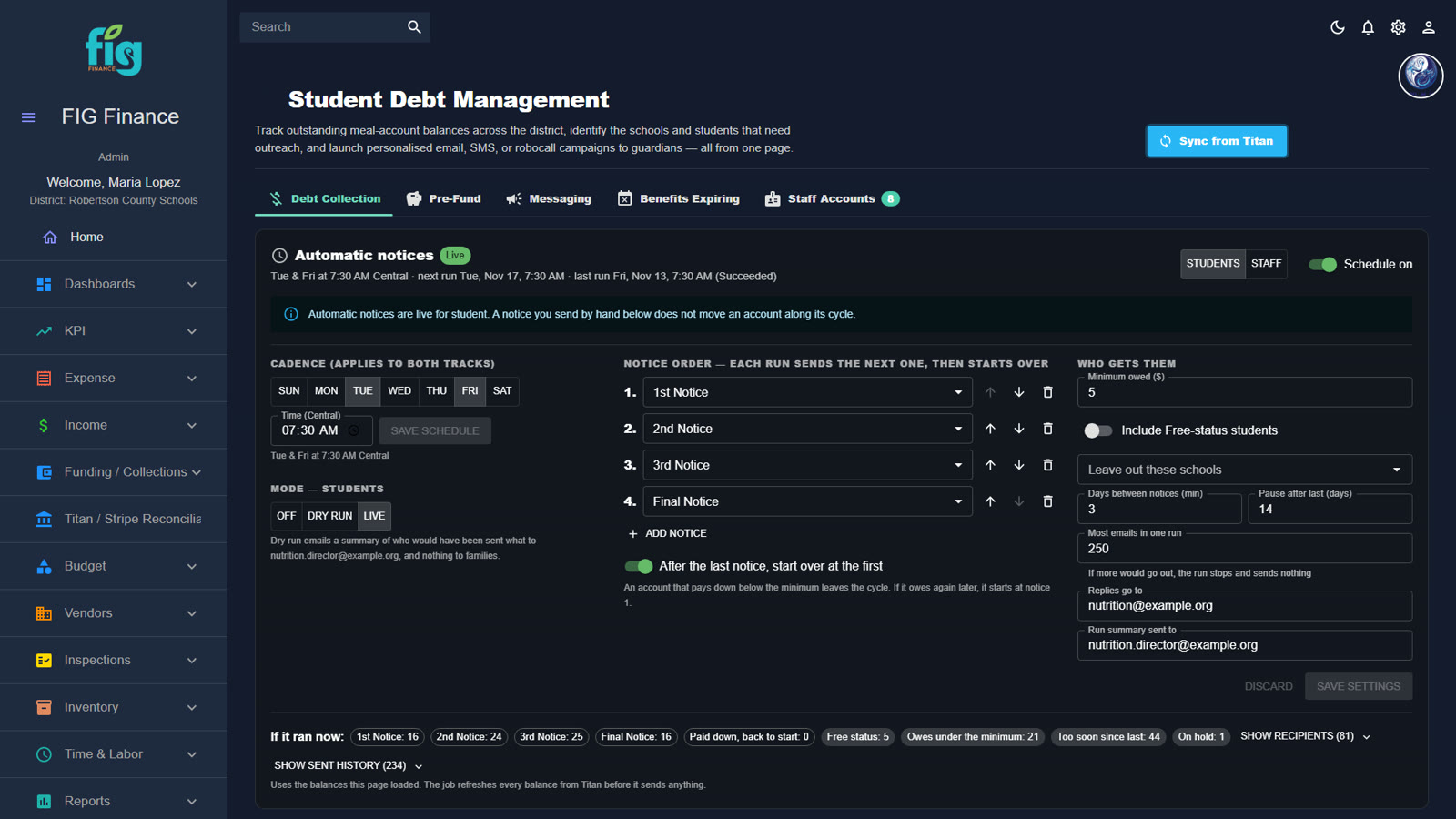
Unpaid meal balances build up even in fully CEP districts. FIG tracks every balance down to the student and sends automatic notices to families, so your team stops chasing them one phone call at a time.

  • Balances tracked down to the individual student
  • Automatic notices to families
  • See which sites and accounts need attention
FIG student negative balance management screen with automatic notices

Real FIG screen · demo data

Our approach

Find what works. Fix what doesn’t. Connect the systems.

Protect every dollar

Pay what you bid. Earn what you're owed.

The modules that guard your purchasing and your reimbursement.

Invoice review vs. bid prices

Every line, checked against your bid.

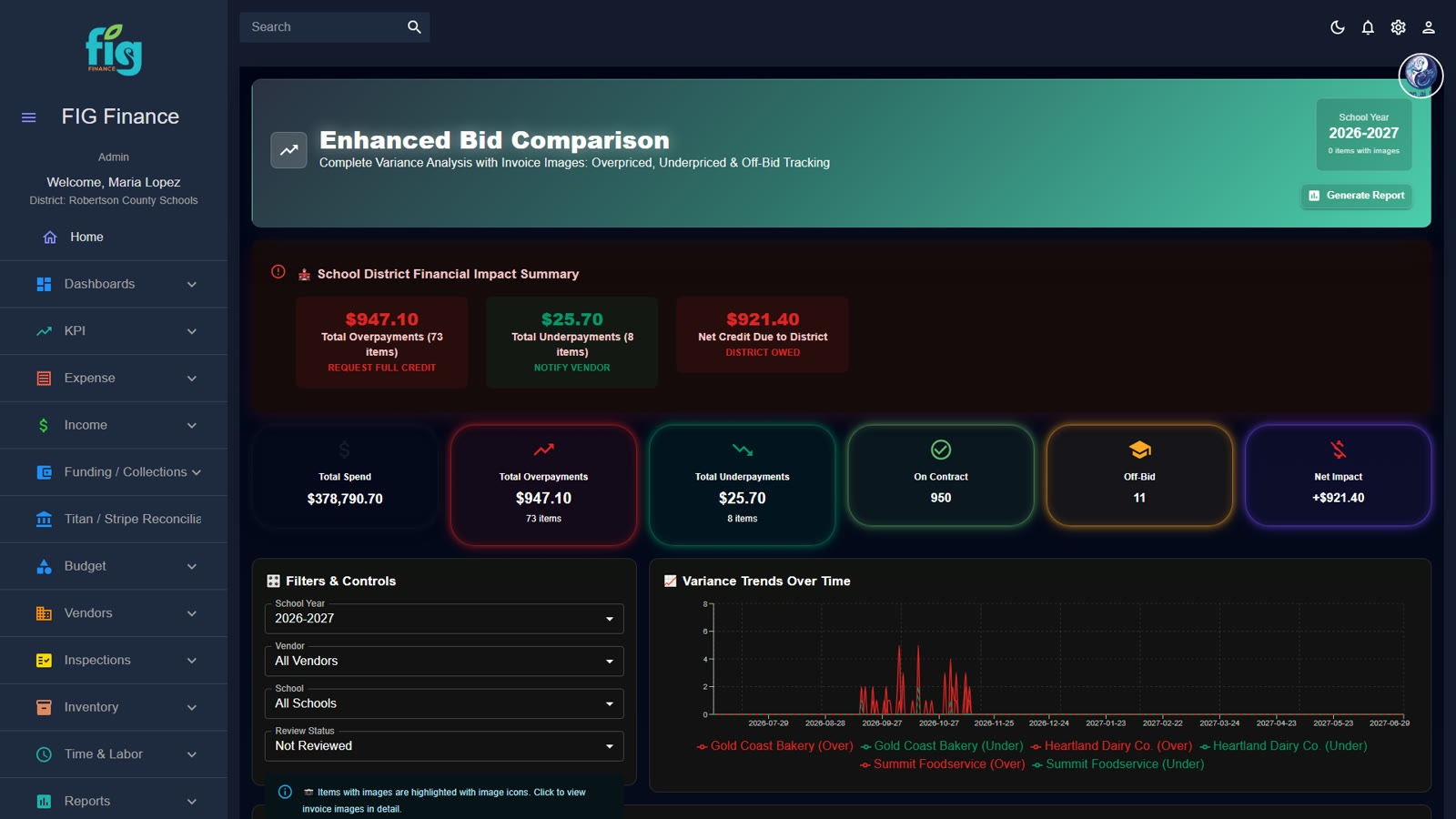
You awarded the bid; FIG makes sure you pay it. Every line on every invoice is compared with your awarded bid prices. When a price comes in high, FIG flags it and prepares the credit request with the invoice image attached, so nobody has to check line by line by hand.

  • Every invoice line compared with the awarded bid
  • Overcharges flagged with credit requests ready to send
  • Invoice images attached to every finding
FIG invoice review screen comparing invoice prices with awarded bid prices

Invoice review vs. bid prices, with credits to request.

Real FIG screen · demo data

Buy American tracking

Buy American, documented.

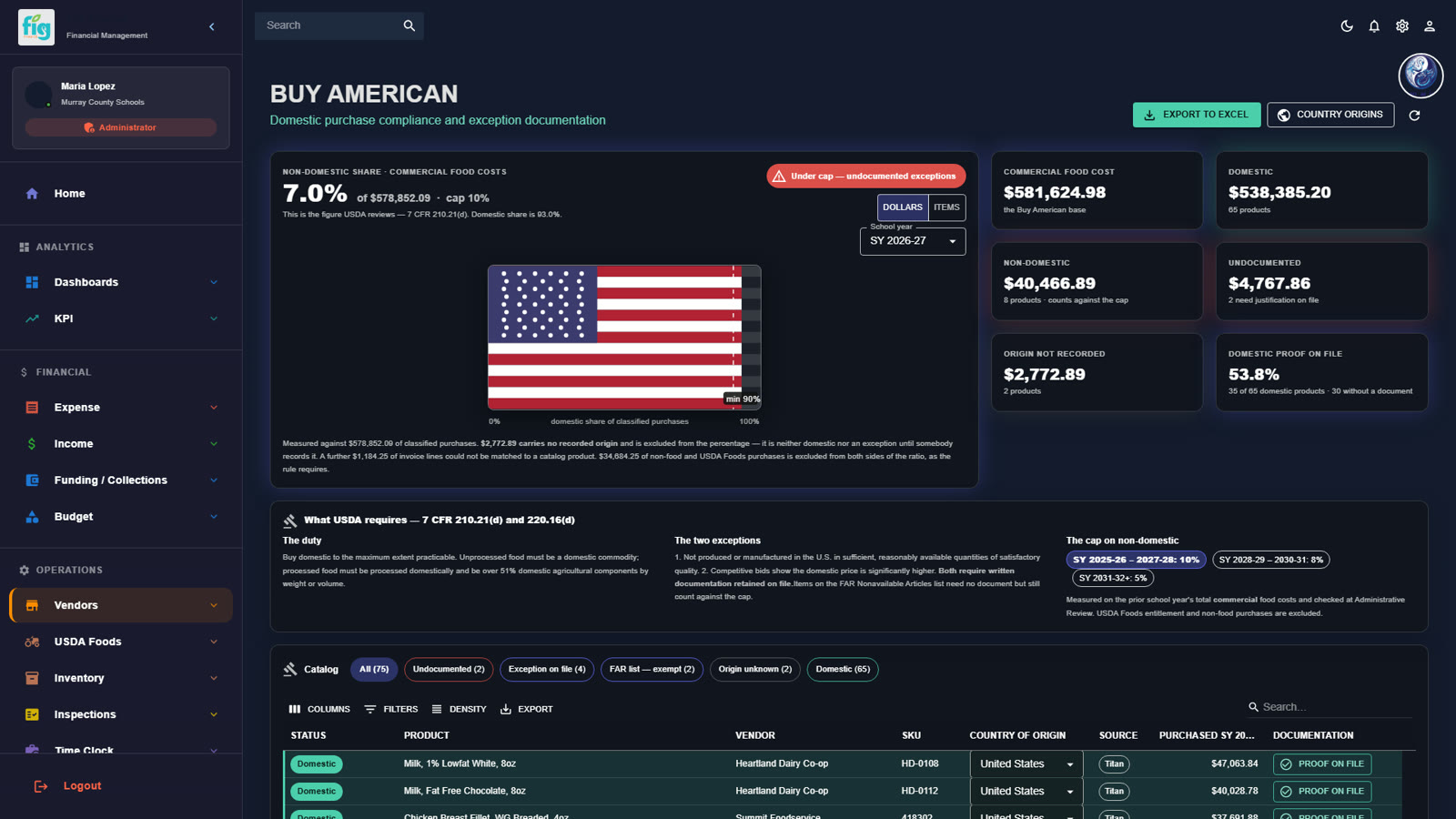
FIG calculates your domestic share of spend from the invoices you already receive, and keeps the documentation with it. When a reviewer asks how you are meeting Buy American requirements, the answer and the paperwork are in one place.

  • Domestic-spend share calculated from your invoices
  • Supporting documentation stored alongside the numbers
  • Ready to show at review time
FIG Buy American compliance screen showing domestic spend share

Real FIG screen · demo data

CEP grouping optimization

Find your best CEP groupings before the deadline.

Which schools you group together under the Community Eligibility Provision changes what you are reimbursed. FIG tests groupings live, so you can find the best one with confidence before the election deadline.

  • Test school groupings live instead of in spreadsheets
  • Compare reimbursement across groupings side by side
  • Decide before the election deadline, not after

The FIG CEP Planner testing groupings live.

Real FIG screen · demo data

Run the operation

KPIs for every aspect of the program.

Labor, safety, inventory and production, measured the same way at every site.

KPIs

Scorecards your managers can act on.

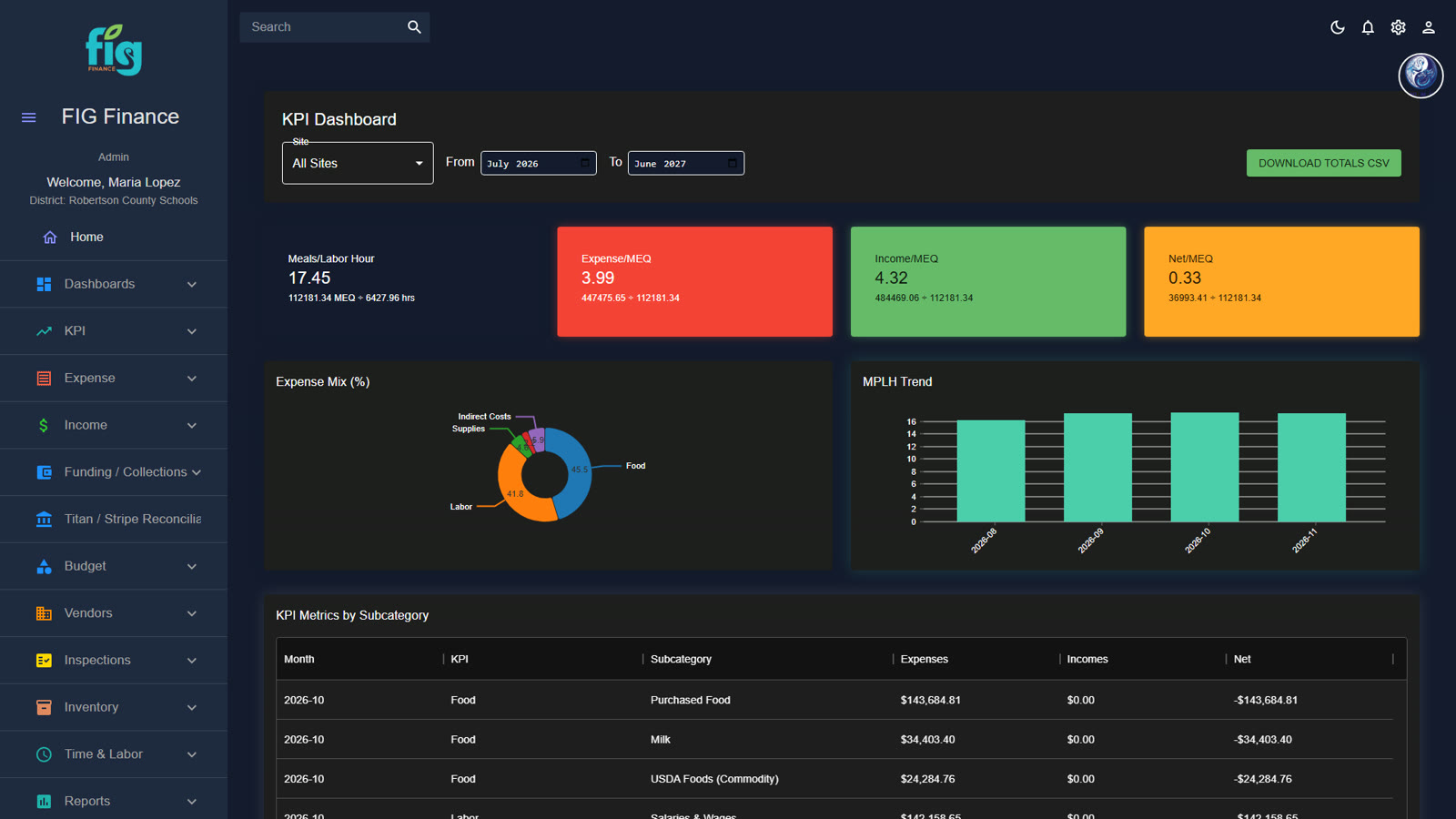
Every site gets a scorecard built from real data: meals per labor hour, income and expense per meal equivalent, participation and more. Directors see the whole program; site managers see exactly where their kitchen stands.

  • Meals per labor hour by site
  • Income and expense per meal equivalent
  • Participation trends you can compare across sites
FIG KPI dashboard with meals per labor hour and per-meal-equivalent measures

Real FIG screen · demo data

Time clock & labor

Labor that lines up with meals served.

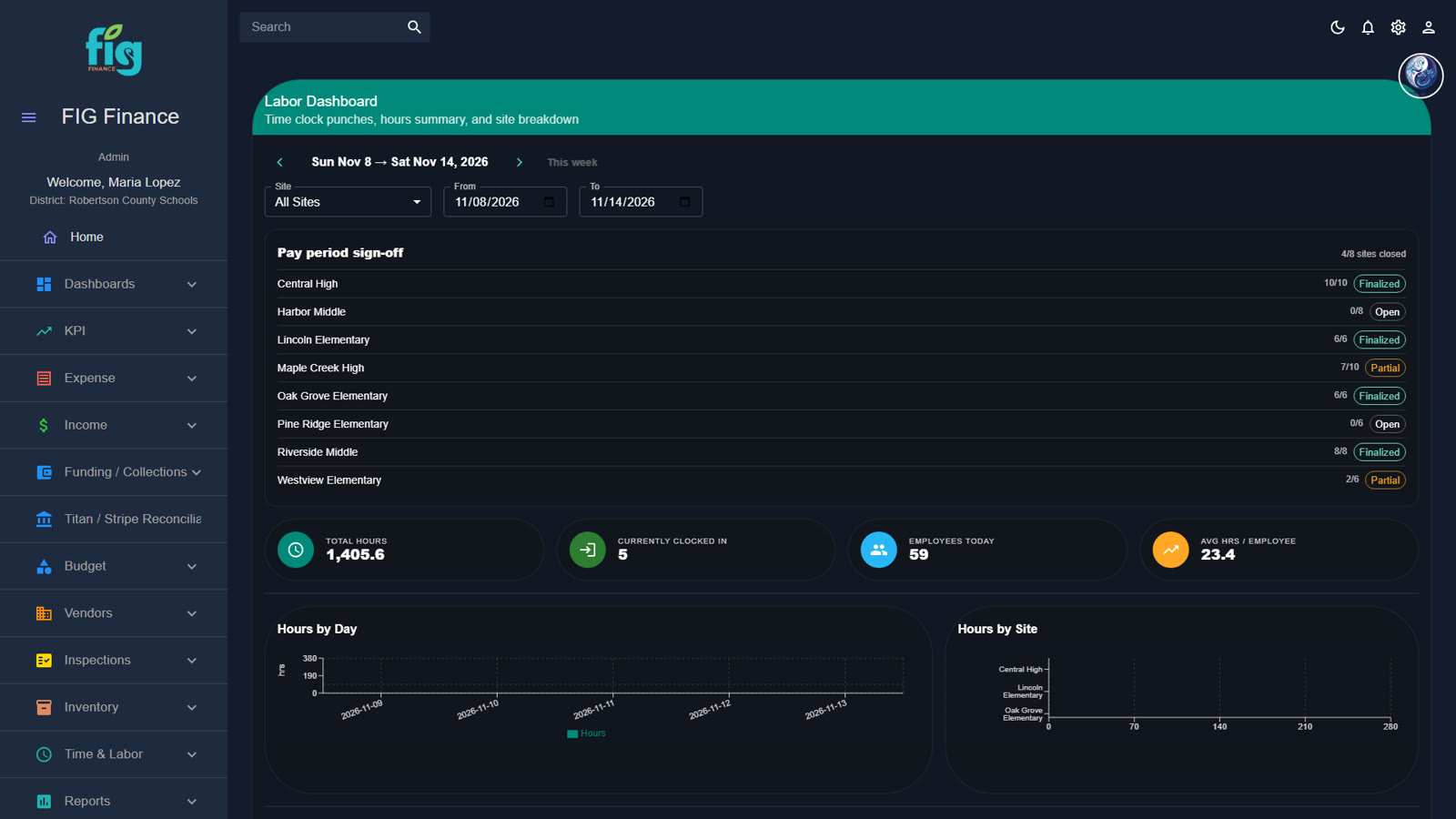
A kiosk time clock, timecard approval and a labor dashboard with alerts. Hours flow straight into your labor cost and your KPIs, so overtime and overstaffing show up while you can still adjust the schedule.

  • Kiosk clock-in for kitchen staff
  • Timecard review and approval
  • Labor dashboard with alerts
FIG labor and time clock dashboard

Real FIG screen · demo data

Inspections

Inspections that close the loop.

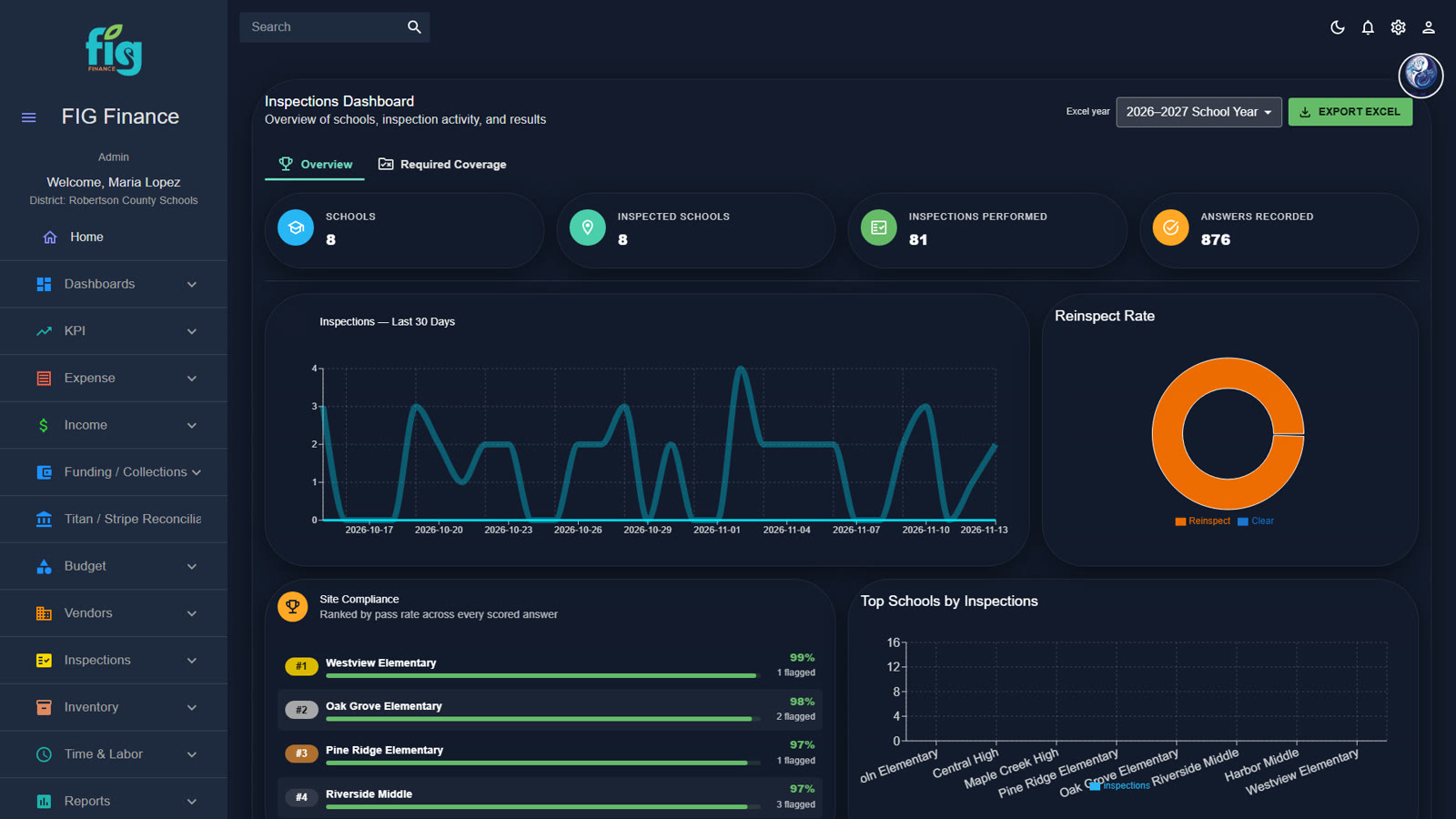
Run site inspections on a phone, build your own templates, and assign corrective action when something needs fixing. Every inspection and every follow-up is on record.

  • Mobile inspections from any site
  • A template builder for your own checklists
  • Corrective action tracked to completion
FIG inspections dashboard

Real FIG screen · demo data

Inventory & production analysis

Know what is on the shelf, and where it went.

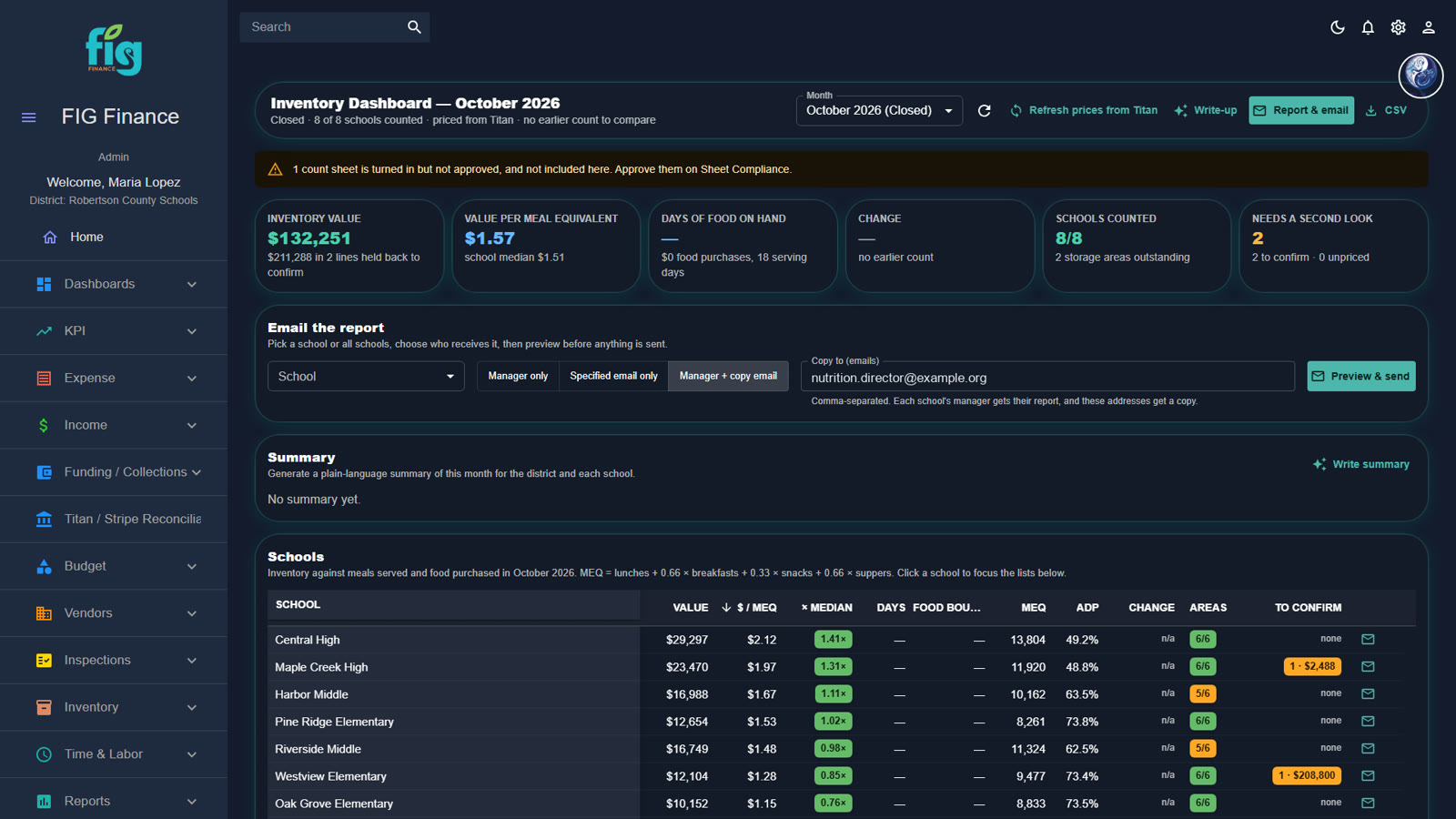
Inventory value by site, mobile counts, and menu and production analysis that tie what you bought to what you served. Waste and shrink stop hiding in the gap between purchasing and production.

  • Inventory value by site
  • Mobile inventory counts
  • Menu and production analysis
FIG inventory dashboard showing inventory value by site

Real FIG screen · demo data

Plan ahead

Next year, built on this year's real numbers.

Budget what you will spend, be ready before anyone asks, and forecast what you will buy.

Budget & audit preparedness

A budget you can defend. An audit you can prepare for.

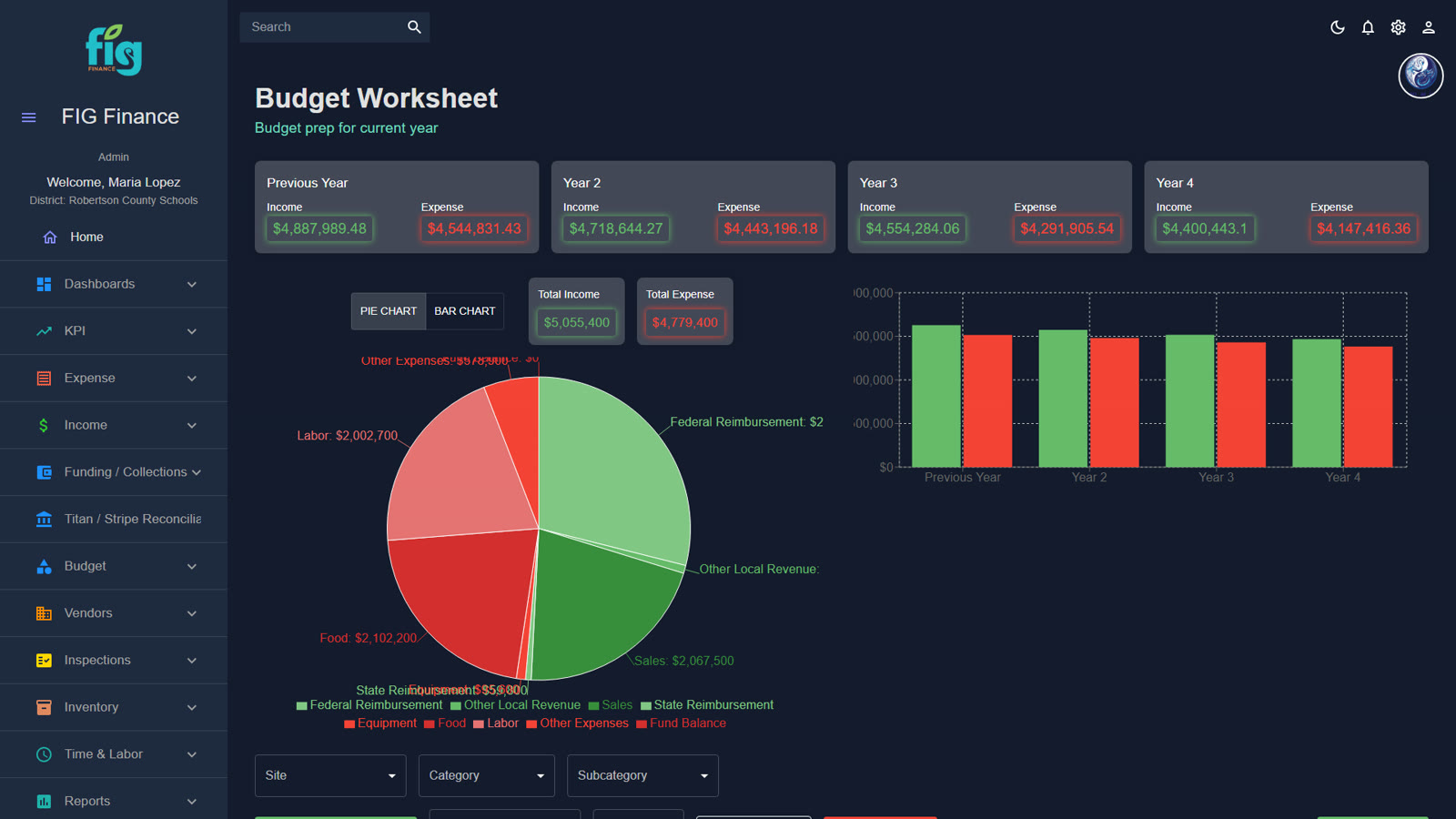
The budget worksheet starts from your history and lets you model scenarios before you commit. It also keeps a reconcilable trail back to the invoices and source documents behind each number, so audit preparation is a matter of pulling records, not rebuilding them.

  • Budget worksheet built from your actual history
  • Scenarios you can compare before you commit
  • A reconcilable trail back to invoice images and source documents
FIG budget worksheet with history and scenarios

Real FIG screen · demo data

Distributor forecasting

Tell distributors what you'll need.

Forecast purchasing from a baseline of what you actually buy, and share it with your distributors before you need it.

Who it's for

One picture, for everyone who runs the program.

Nutrition directors

Real-time numbers for every site, consistent measures across the program, and far less time spent assembling reports.

Business, finance & purchasing

Invoices checked against bid, payments reconciled, and a trail back to source documents when it is time to close the books.

Site & kitchen managers

A scorecard for their own kitchen, a time clock that just works, and inspections and counts on a phone.

FSMCs & multi-district operators

Running a food service management company? FIG Learning's portfolio management is built to accommodate FSMC portfolios across many districts, and is ready for state-level reporting and oversight.

Portfolio management

Better together

It starts with people.

FIG Learning Management comes first: a learning path for every position, training in their own language and CEUs on one transcript. Trained, consistent teams are what make the numbers move. The Middle of the House then shows you where they are moving, site by site.

Questions we hear

Before you ask.

Do we have to replace our POS, purchasing or payroll system?

No. FIG connects the systems you already run, through their APIs, their exports or document intelligence on the files they produce. Your staff keep the tools they know. FIG makes the systems you already have more valuable by bringing their data together.

Will FIG's numbers match our general ledger?

FIG keeps a reconcilable trail back to source documents (invoices, with their images attached), so your business office can trace where a number came from.

This sounds like a lot for my team to take on.

You don't turn everything on at once. Start with the problem that hurts most, whether that is the P&L, invoice review or negative balances, and add modules as the team is ready. The screens are designed to feel like the apps your managers already use.

Budgets are tight. Is finance software a nice-to-have?

The Middle of the House is built around money you are already losing track of: overcharges against your awarded bid, labor hours that don't match meals served, inventory and waste you can't see, unpaid balances, and CEP groupings that leave reimbursement on the table. It is designed to pay attention to every dollar so your team doesn't have to do it by hand.

Are we on our own after we sign?

No. FIG is software and a service. Our team works with yours through implementation with regular working meetings, connects your systems, and stays with you as you expand. You're never doing this alone.

How do districts buy FIG?

Depending on your purchasing rules, that may be a sole-source purchase, a cooperative contract or an RFP. We will walk your purchasing team through the route that fits, and we'll help with the paperwork.

Who owns our data?

You do. Your data stays yours and can be exported. We will walk your IT and security team through how FIG handles student and staff information before anything is connected.

FIG Middle of the House (Finance)

See your real numbers.

Tell us which systems you run today. We'll show you how FIG connects them and what your program looks like with all of the data in one place.